
Video to audio, without uploading the video
The extractor runs inside this tab. Your video is never sent to a server — it is never even copied into memory, because only the soundtrack is read. Most files come out without re-encoding at all.
- Nothing is uploaded: the page reads the file off your own disk
- Usually no re-encode — the soundtrack is lifted out untouched
- No sign-up, no daily limit, no watermark
- Picks the right soundtrack when a film carries several
Get the audio out of a video — in this tab
MP4, MOV, MKV, WebM, AVI and more, out as MP3, M4A, WAV or FLAC. No upload, no limit.
Starting the extractor…
Why this one is different
Most online extractors upload your video to a server, cap the file size for free users, and re-encode everything whether it needs it or not. This one runs in the page, takes the soundtrack out untouched wherever the format allows, and tells you what a conversion will cost before you press the button.
The video never leaves — or even loads
There is no upload step to opt out of and no copy of your recording waiting on a server to be deleted in 24 hours. The file is not even read into the tab's memory: FFmpeg is handed the file itself and reads the slices it needs, so the picture is skipped entirely and only the soundtrack passes through.
Usually no re-encode at all
An MP4's soundtrack is AAC, and M4A is the container AAC belongs in — so taking it out is a copy, not a conversion. Every sample survives and a two-hour film takes seconds. An old AVI usually has MP3 inside it, and a WebM has Opus; both come out the same way.
It knows which soundtrack you meant
A film in MKV carries the original language, a dub and often a commentary. Other converters silently take the first one. This lists every soundtrack with its language, codec and bitrate, and lets you choose before anything runs.
How it works
Choose the video
Click the box or drag a file in. It is read straight off your disk — and not copied into memory either, which is why a two-hour film works in a browser tab.
See what is actually inside
The extractor reads the real streams: the codec, the bitrate, and every soundtrack the file carries. Most sites make you upload first and tell you nothing.
Pick a format
It says before you commit whether the audio can come out untouched or has to be re-encoded, and what that costs.
Download the audio
The finished file lands in your downloads. It never existed anywhere but your own machine.
The engine is a 32 MB download the first time and cached for a year after that. The long version, including what it cannot do.
What comes out, and what it costs
Eight output formats, and it reads the soundtrack inside 29 kinds of video file.
| Extension | Format | Type | Use it when | Copies untouched from |
|---|---|---|---|---|
| .mp3 | MP3 | Lossy | Plays on everything ever made. The safe answer. | MP3 |
| .m4a | M4A | Lossy | AAC in an Apple container. Most video already carries AAC, so this is usually a copy. | AAC |
| .wav | WAV | Uncompressed | Uncompressed. What editors and transcription tools ask for. | 16-bit PCM |
| .flac | FLAC | Lossless | Lossless and about half the size of WAV. | FLAC |
| .aac | AAC | Lossy | Raw AAC stream. Use M4A unless something specifically asked for .aac. | AAC |
| .ogg | OGG | Lossy | Vorbis in OGG. Common in games, Godot and Unity. | Vorbis |
| .opus | OPUS | Lossy | The original Opus track, lifted out untouched. WebM and Discord clips usually carry it. | Opus |
| .m4r | M4R | Lossy | iPhone ringtone. What Finder and iTunes require; iOS 26 also takes a plain MP3. | AAC |
Which extractions skip the encoder entirely
Where a “copy” appears below, the audio is not decoded and re-encoded — it is lifted out of the video and re-wrapped. The result is identical to the soundtrack in the file, and it takes seconds regardless of length.
| The soundtrack in your video | MP3 | M4A | WAV | FLAC | AAC | OGG | OPUS | M4R |
|---|---|---|---|---|---|---|---|---|
| AACMP4, MOV, M4V, 3GP — phone video, screen recordings, most downloads | encode | copy | encode | encode | copy | encode | — | copy |
| MP3AVI, MKV, FLV — older camcorder and download files | copy | encode | encode | encode | encode | encode | — | encode |
| OpusWebM — browser and Discord recordings | encode | encode | encode | encode | encode | encode | copy | encode |
| VorbisWebM, OGV — older web video | encode | encode | encode | encode | encode | copy | — | encode |
| AC-3MKV, TS, VOB — films, DVD rips, broadcast | encode | encode | encode | encode | encode | encode | — | encode |
| 16-bit PCMMOV, AVI, MXF — camera and editing masters | encode | encode | copy | encode | encode | encode | — | encode |
| DTSMKV, TS — Blu-ray rips | encode | encode | encode | encode | encode | encode | — | encode |
| WMAWMV, ASF — older Windows video | encode | encode | encode | encode | encode | encode | — | encode |
Every extractor on this site
MP4 to MP3
The one everybody searches for. Plays on anything, at the bitrate you choose.
Extract audio from video
Any container, any soundtrack. Keeps the audio untouched wherever the format allows.
Video to MP3
Whatever the container, out comes an MP3 that plays on everything.
MOV to MP3
iPhone and QuickTime video. Usually AAC inside, which can come out without a re-encode.
MKV to MP3
Lists every soundtrack by language, so a dub does not come out by accident.
WebM to MP3
Browser, OBS and Discord recordings. The Opus track can also come out untouched.
AVI to MP3
Old camcorder and download files. The MP3 inside comes straight out, unchanged.
Video to WAV
Uncompressed 16 or 24-bit, for editing, transcription and anything that refuses compressed audio.
MP4 to M4A (no re-encode)
The soundtrack, lifted out exactly as it was recorded. Nothing is decoded or compressed again.
Video to ringtone
Pick 30 seconds from the video itself and set it from the Files app — no computer needed on iOS 26.
Get it on your phone
Your videos are usually on the phone already, and moving one to a laptop to get the sound out is the slowest part of the job. The app converts them where they are — offline, with no browser involved.
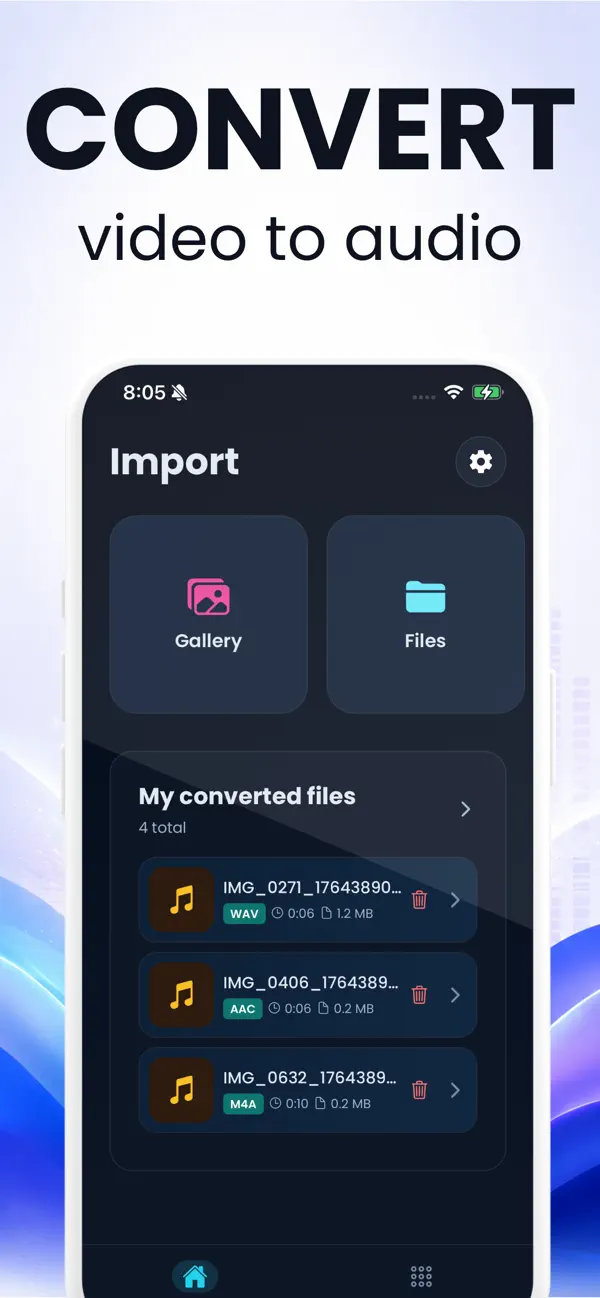
- Converts straight from the camera roll or Files
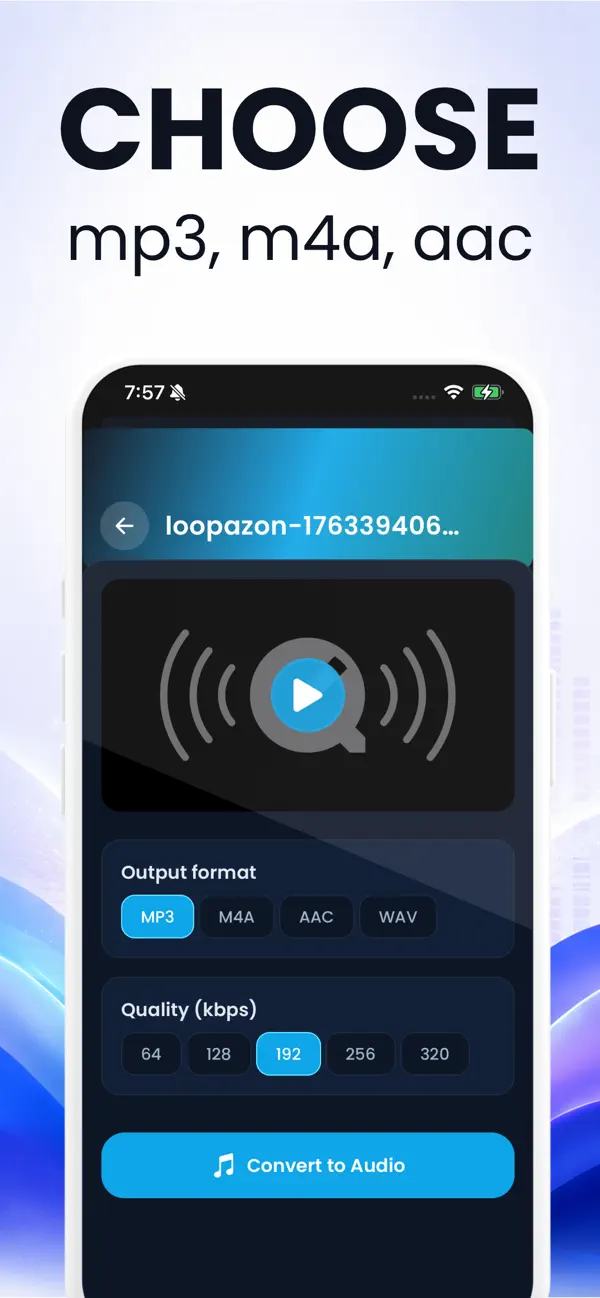
- MP3, M4A, AAC and WAV at 64–320 kbps
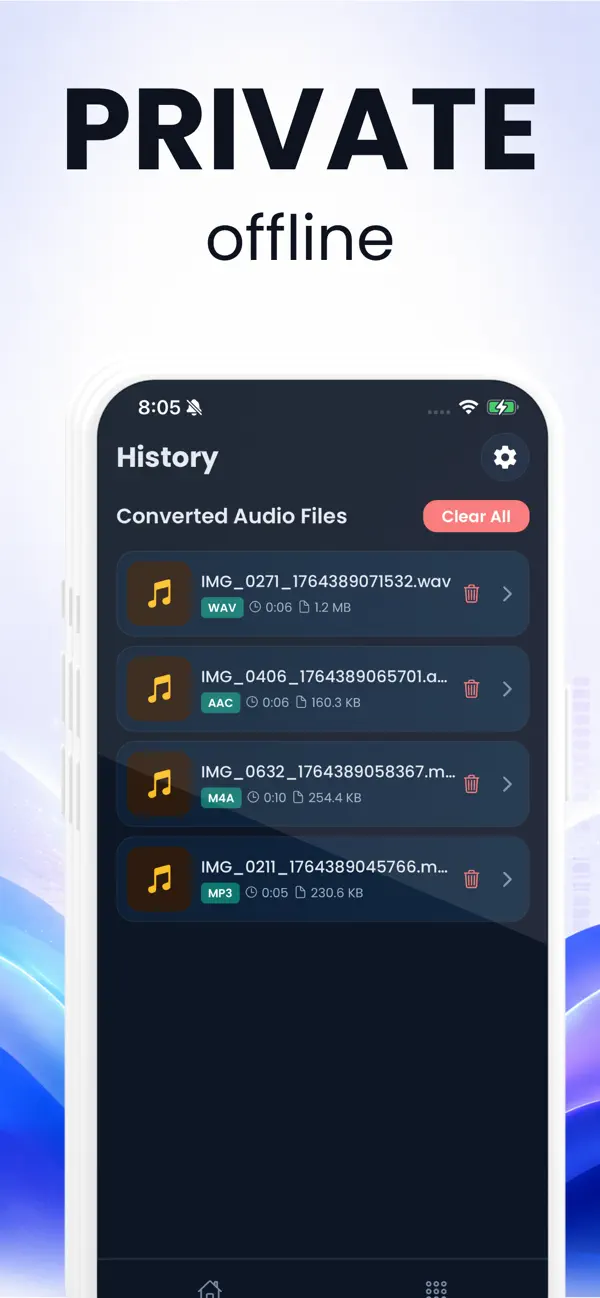
- Works with no signal — nothing is uploaded there either
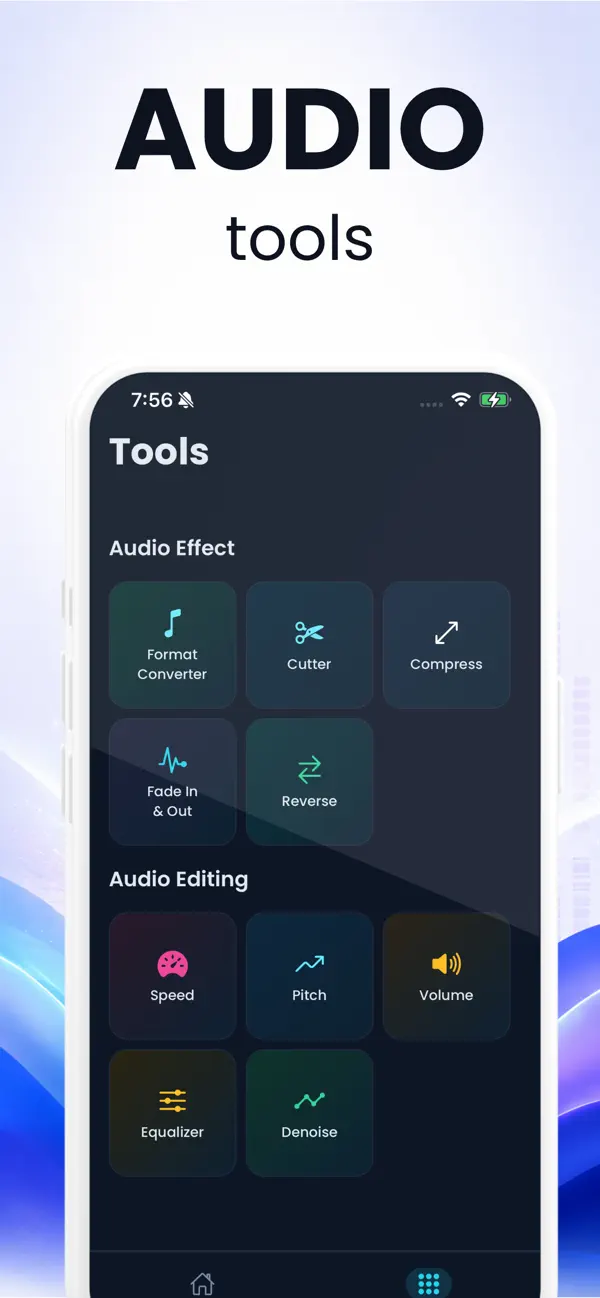
- Twelve audio tools: cutter, fade, speed, pitch, equalizer, denoise and more
Free to install with one free conversion, then a subscription for unlimited use. One video at a time — the queue on this website is the place for a folder of them. 4.6 out of 5 from 41 ratings on the App Store, read on 19 September 2026.
The same job on your phone
These are the app's real screens. The website is the better tool at a desk with a file already on the machine; the app is the better tool when the video is in your camera roll, when you are offline, or when you want it in the share sheet.
Guides
Written for the specific thing you searched for, not a generic “how to convert video” page.
Extract audio on an iPhone
Four routes that work on iOS 26, and the one Apple quietly removed.
iPhoneThe Shortcuts app route
It works, it is free, and it hands you an M4A — not an MP3. Here is how to build it.
AndroidExtract audio on Android
Chrome on the phone can do this on its own — and what to watch for on Samsung.
WindowsMP4 to MP3 on Windows
What Windows ships with, what Clipchamp actually does, and the fastest way in a browser.
macOSMP4 to MP3 on a Mac
QuickTime gives you an M4A, not an MP3. Four routes compared, including the one-line Terminal command.
VLCThe VLC route, step by step
The exact menu path, plus the two settings that make VLC produce an empty or silent file.
CapCutCapCut's extract audio
Detaching the audio is easy. Exporting it as an audio file is the part that stumps people.
iMovieiMovie detach and export
Detach Audio exists on both Mac and iPhone. Audio-only export exists on only one of them.
QualityKeeping the original quality
Every MP3 conversion is a second lossy encode. There is a way around it, and it is not a setting.
Questions people actually ask
Is my video uploaded anywhere?
No. The extractor is FFmpeg compiled to WebAssembly and it runs inside this browser tab, so your video never travels anywhere. You do not have to take our word for it: load the page, turn off your Wi-Fi, and extract something. It still works.
Learn more: How it worksDoes converting a video to MP3 lose quality?
A little, yes — the soundtrack inside a video has already been compressed once, and MP3 compresses it again. At 192 kbps and above almost nobody can hear the difference on one pass. If you want to avoid it entirely, take the audio out as M4A: that is a copy, not a conversion, and every sample survives.
Learn more: Keeping the originalHow big a video can this handle?
Far bigger than other browser tools, because the video is never loaded into memory — it is mounted and read in slices, so only the soundtrack passes through. A two-hour film is fine on a desktop browser. The ceiling is around 2 GB, where the WebAssembly build's file addressing gives out, and it is lower on an iPhone because Safari gives a tab less room.
Learn more: How it worksCan I take the audio from a YouTube or TikTok link?
No, and nothing on this site will. It works on files that are already on your device — a recording you made, a video someone sent you, an export from an editor. Pasting a link to someone else's video is a different thing entirely, and it is not what this is for.
Learn more: Extract audioMy film has several soundtracks. Can I choose?
Yes, and that is unusual — most converters silently take the first one. An MKV often carries the original language, a dub and a commentary track, so the extractor lists every soundtrack with its language, codec and bitrate and lets you pick before it runs.
Learn more: MKV to MP3Why is there no MP3 option that keeps the original quality?
Because there is no such thing. A video's audio is almost never MP3 — it is AAC, or Opus, or AC-3 — so writing an MP3 always means decoding it and compressing it again. The formats that can hold the original untouched are M4A for AAC, OGG or .opus for Opus, and MP3 only when an old AVI already had MP3 inside it.
Learn more: Keeping the originalDo I need to install anything?
No. No account, no extension, no sign-up and no watermark. The engine is a 32 MB download the first time you use it, then cached for a year, and it works on Chrome, Edge, Firefox and Safari on a desktop, and in Chrome on Android.
Learn more: On AndroidCan I take just one part of the video?
Yes. Choose “Just a section”, scrub the video to the moment you want and mark the start and end. When the audio is being copied rather than re-encoded, the cut lands on the nearest compressed frame, which is within about a fortieth of a second of where you put it.
Learn more: Video to ringtoneWhat about a video with no sound?
The extractor says so by name rather than producing an empty file. Silent screen recordings are the usual cause: iOS records app audio only when you ask it to, and many screen recorders capture the microphone and nothing else.
Learn more: Screen recordingsIs there an app for this?
Yes, for iPhone and iPad — it is the same job done on the device, which is where your videos usually are. It converts from Photos or Files offline, keeps a history of what you converted, and has twelve audio tools alongside the converter.
Learn more: The iPhone appPut it on your phone too
The videos you want the sound from are usually already on the phone. The app converts them there, offline, and keeps a history so you can share a finished file again without redoing it.
The extractor on this site stays free either way — no account, no upload, no daily limit.